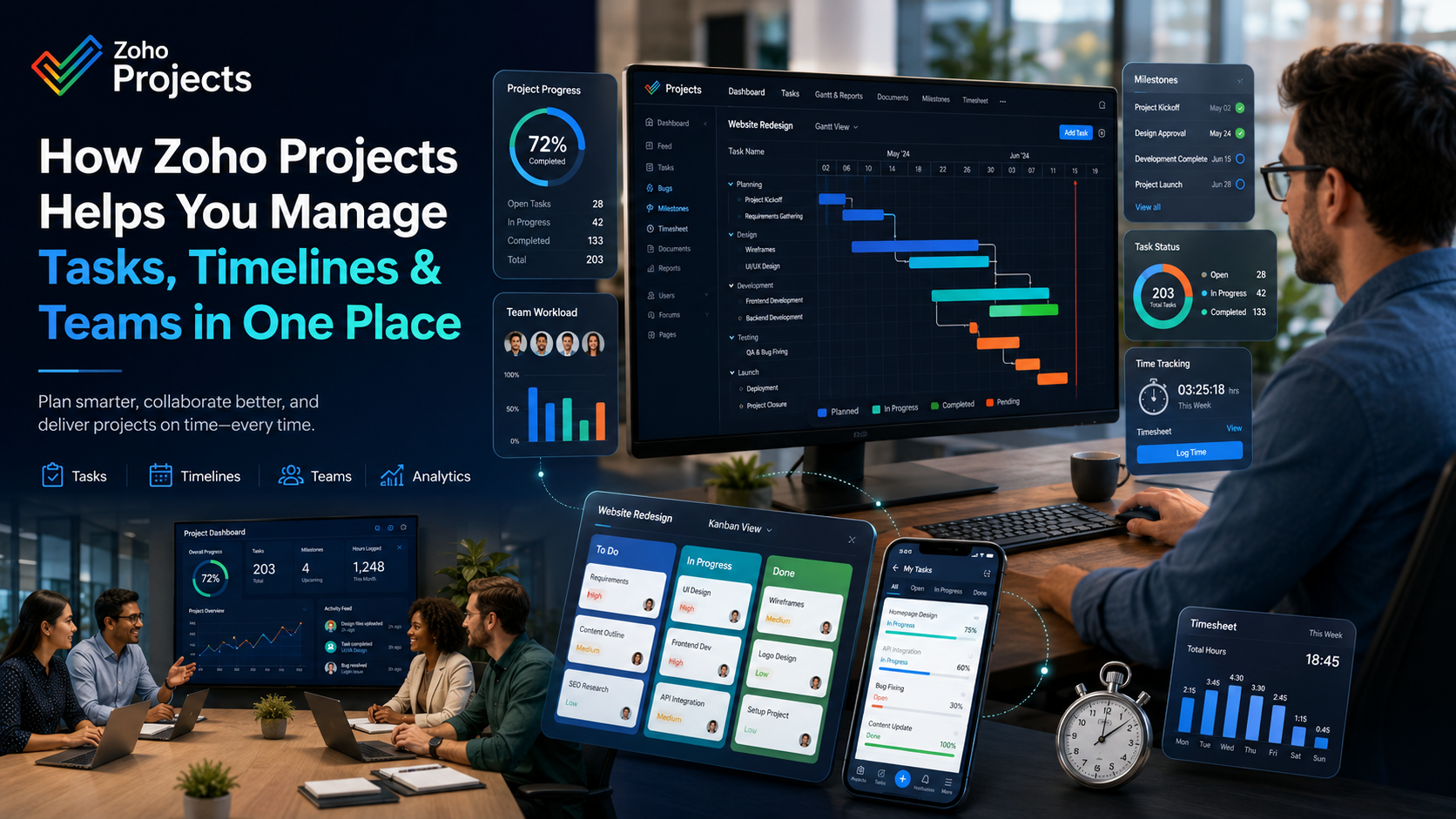
How Zoho Projects Helps You Manage Tasks, Timelines and Teams in One Place
A deep dive into the platform that brings clarity, accountability, and momentum to every project - without the chaos of scattered tools.
If you've ever juggled a dozen spreadsheets, chased teammates on Slack for status updates, and still missed a deadline - you already know the pain. Modern teams are busier than ever, but "busy" doesn't always mean "productive."
What most teams lack isn't effort - it's clarity : clarity on who owns what, when things are due, and how the whole project is progressing.
That's exactly the problem Zoho Projects was built to solve. It's a comprehensive, cloud-based project management platform that brings tasks, timelines, and team collaboration under one roof - so nothing slips through the cracks.
Let's break down exactly how it does that.
What Is Zoho Projects?
Zoho Projects is part of the broader Zoho ecosystem - a suite of 50+ business apps used by over 100 million users worldwide. Unlike standalone tools, Zoho Projects is designed to work seamlessly with tools you may already use: Zoho CRM, Zoho Mail, Slack, Google Workspace, Microsoft Teams, and more.
Whether you're running a creative agency, a software development firm, a construction company, or an e-commerce business - Zoho Projects scales to your workflow.
✅ Task Management: Know Exactly What Needs to Get Done
At the heart of every project is a list of tasks. Zoho Projects gives you deep control over how tasks are created, organized, and tracked.
📋Task Lists & Subtasks
Group related tasks into lists like "Design Phase" or "QA & Testing." Break large tasks into subtasks with their own owners and deadlines.
🔗Task Dependencies
Set dependencies so your team knows when a task can begin. Zoho Projects enforces the sequence and alerts people when something runs late.
🏷️Custom Fields & Tags
Add custom fields - dropdown, text, date, number - to capture exactly the information your business needs, from client name to approval status.
👤Task Priorities & Owners
Assign tasks to team members with clear priority levels (High, Medium, Low). Everyone knows what's on their plate and what needs attention first.
💡 PRO TIP
Use the "My Tasks" view so each team member sees only their assignments - reducing overwhelm and improving focus without needing a separate stand-up meeting.
📊Timelines & Gantt Charts: See the Big Picture at a Glance
One of Zoho Projects' most powerful features is its interactive Gantt Chart - a visual timeline that shows you the entire project from start to finish.
What You Can Do with the Gantt Chart
· Drag and drop tasks to adjust timelines on the fly
· Visualize task dependencies with connecting arrows
· Track baseline vs. actual progress to spot delays early
· Zoom in or out from day-level to month-level views
· Identify the critical path - the sequence of tasks that directly impacts your project deadline
Instead of manually updating timelines in a spreadsheet (and hoping everyone sees the latest version), the Gantt chart updates in real time as tasks progress.
Milestone Tracking
Set project milestones - key checkpoints like "MVP Launch," "Client Presentation," or "Phase 1 Complete" - and track them visually on the timeline. Milestones help teams stay aligned on major goals, not just individual tasks.
💬Team Collaboration: Keep Everyone on the Same Page
A project tool is only as good as the communication it enables. Zoho Projects includes a rich set of collaboration features that reduce email chains and keep conversations in context.
💬Task-Level Comments & Feeds
Comment directly on tasks - tag teammates, attach files, and ask questions where the work actually lives. No more hunting through email threads.
📁Document Management
Upload briefs, contracts, design files, and meeting notes directly into the project. Version history ensures no one works from an outdated file.
📡Activity Feed
See a real-time stream of everything happening in your project: tasks completed, comments added, files uploaded, milestones hit.
🔔@Mentions & Notifications
Tag someone with @mention to pull them into a conversation. Smart notifications alert team members about the things that matter — without spam.
⏱️Time Tracking: Know Where Every Hour Goes
Time is money - and Zoho Projects takes time tracking seriously.
Built-in Timers
Team members can log time directly on tasks using a built-in timer or manual time entry. No more guessing how long something took at the end of the week.
Billable vs. Non-Billable Hours
Mark hours as billable or non-billable - ideal for agencies and consultancies managing client billing. Logged hours can feed directly into invoices via Zoho Invoice or Zoho Books.
Timesheets
Managers get a weekly timesheet view showing exactly how each team member's hours are being spent across tasks and projects. Spot burnout risks, inefficiencies, and scope creep before they become problems.
📈Reports & Dashboards: Data-Driven Decision Making
You can't improve what you can't measure. Zoho Projects gives you the reporting horsepower to understand not just where things stand - but why.
🖥️Project Dashboard
A visual snapshot of project health: task completion rates, overdue tasks, upcoming milestones, hours logged, and team workload - all in one view.
👥Resource Utilization Reports
See how your team's capacity is being used. Balance workloads intelligently - spot who's overloaded and who has bandwidth.
🐛Bug & Issue Tracking
For software teams: log bugs, link them to tasks, track resolution status, and generate defect trend reports over time.
📤Exportable Reports
Export any report to PDF, Excel, or CSV to share with stakeholders or feed into external business intelligence systems.
⚡Automations: Stop Doing the Same Thing Twice
Repetitive manual work kills productivity. Zoho Projects' workflow automation feature lets you define rules that trigger actions automatically.
· ✅ When a task is marked "Complete," automatically notify the next task's assignee
· ⚠️ When a due date is missed, send an alert to the project manager
· 👤 When a new task is created in a certain list, auto-assign it to a specific team member
· 🏆 When a milestone is hit, send a congratulatory message to the project feed
Automations eliminate the "did you remember to..." conversations and ensure your process runs consistently - even when people forget.
🔌Integrations: Connect Your Entire Workflow
Zoho Projects doesn't live in a silo. Its integration library connects it with the tools your team already relies on.
| Integration | Use Case |
| Zoho CRM | Link projects to deals and contacts |
| Zoho Books / Invoice | Convert timesheets directly into invoices |
| Slack | Get project notifications in Slack channels |
| Google Drive / Docs | Attach Google Docs directly to tasks |
| Microsoft Teams | Collaborate across Teams and Projects |
| GitHub / Bitbucket | Link commits and pull requests to tasks |
| Zapier | Connect with 3,000+ apps via automation |
| Zoom | Start meetings directly from the project |
Whether your team is remote, hybrid, or in-office - Zoho Projects fits into the way you already work.
📱Mobile App: Manage Projects From Anywhere
The Zoho Projects mobile app (iOS & Android) puts the full power of the platform in your pocket. Update task statuses, log time, leave comments, and review the Gantt chart - all from your phone.
For field teams, remote workers, or managers who are always on the move, the mobile app ensures you're never out of the loop.
Who Is Zoho Projects Best For?
Zoho Projects is flexible enough for a wide range of teams and industries.
🎨Agencies
Managing multiple client projects simultaneously
💻Software Teams
Sprints, bug tracking & GitHub integration
🏗️Construction Firms
Long-horizon Gantt-driven project planning
📣Marketing Teams
Campaigns, content calendars & launches
🚀Startups
Powerful tools without enterprise pricing
🏢Enterprises
Portfolio-level oversight across many projects
Pricing: More Value Than You'd Expect
🆓Free Plan Available
Zoho Projects offers a free plan for up to 3 users with 2 projects - making it easy to get started without a credit card. Paid plans start at a very competitive price point compared to Asana, Monday.com, or Jira, making it a favourite for budget-conscious teams that refuse to compromise on features.
Zoho Projects vs. The Competition
| Feature | Zoho Projects | Asana | Monday.com | Jira |
|---|---|---|---|---|
| Gantt Charts | ✅ Built-in | ⚠️ Premium only | ✅ | ✅ |
| Time Tracking | ✅ Built-in | ❌ | ⚠️ Add-on | ⚠️ Add-on |
| Free Plan | ✅ | ✅ | ❌ | ✅ |
| Bug Tracking | ✅ | ❌ | ❌ | ✅ |
| CRM Integration | ✅ Native | ⚠️ Third-party | ⚠️ Third-party | ⚠️ Third-party |
| Pricing (per user) | 💰 Budget-friendly | 💰💰 | 💰💰💰 | 💰 |
Getting Started with Zoho Projects
Setting up your first project in Zoho Projects takes less than 10 minutes:
1 Sign up at zoho.com/projects - the free plan requires no credit card
2 Create your first project - add a name, description, and deadline
3 Build your task list - break the project into phases and tasks
4 Invite your team - assign tasks to each member
5 Set up your Gantt chart - add dependencies and milestones
6 Configure notifications - so everyone stays informed automatically
7 Start tracking time - enable timers for billable work
From there, your team has everything it needs to work with clarity, accountability, and momentum.
One Platform, Total Clarity
The best project management tool isn't the one with the most features - it's the one your team will actually use, consistently.
Zoho Projects strikes that balance well: it's powerful enough for complex enterprise workflows, yet intuitive enough that teams adopt it without weeks of training. With task management, Gantt timelines, team collaboration, time tracking, automation, and reporting all in one platform - at a price that respects your budget - it's one of the most complete project management solutions available today.
If your team is tired of scattered tools and missed deadlines, Zoho Projects might just be the single source of truth you've been looking for.
"Ready to bring your projects, timelines, and teams together?"